

Introduction
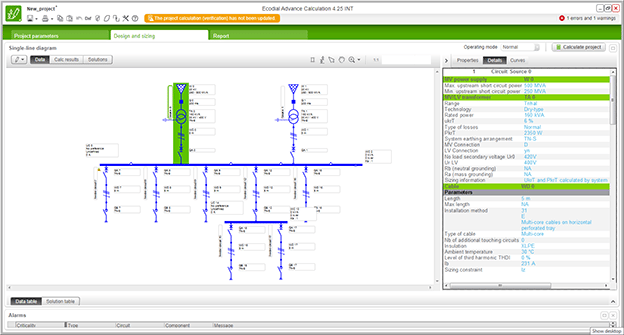
Ecodial is low voltage electrical installation design software developed by Schneider Electric. It actually calculates LV electrical networks and helps you to choose the right equipment and to optimize your electrical installation.
Ecodial is free for download, you just have to register in order to receive licence key.
Schneider Electric devices
If you need a snapshot calculation Ecodial provides you with reliable results in a few clicks. If you need to easily find a product without entering into the Schneider Electric catalogue, Ecodial offers you a technically-oriented search engine for selection of a product, discrimination and cascading.
What can you do with Ecodial?
Calculation module of a single branch network:
- You select quickly and easily an LV network made with a single branch at three levels.
- You customise the few input parameters to meet your requirements.
- You let the power engine calculate for you in compliance with electrical standards.
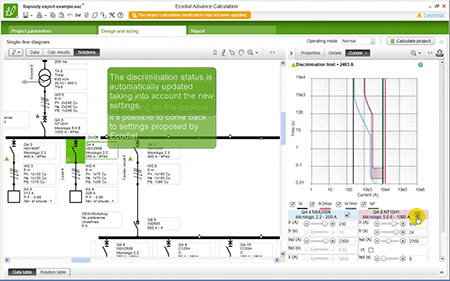
- You visualise the discrimination limits of your protective device system by using versatile tripping-curve diagrams.
- You print out a comprehensive and clear report to prove your calculation
Direct coordination: an advanced search engine to define & coordinate Schneider Electric devices:
- You define the electrical constraints that your single search device must support. Search and select.
- You define upstream and downstream the electrical constraints of your protective system. Search and coordinate between two devices.

Ecodial screenshot - You display and set the tripping curve of the device.
- Coordination means discrimination, cascading
What’s New in version 4.8
- 3 supported languages: English (en-GB), French (fr-CA), Spanish (es-ES)
- Due to changes done in this version registered users of the previous INT version, are again need do a re-registration on the new authentication module
Switchgear status and operating modes
This property determines the open/closed (off/on) position of circuit breakers and switches in the various operating modes. Ecodial can manage different status conditions of switchgear depending on the operating mode.
This makes it possible to take into account installations supplied by multiple sources, those offering load shedding and those with seasonal operating modes, for example.
When the status of a circuit breaker or switch is “closed“,, the circuit downstream of the circuit breaker (or switch) is supplied in the current operating mode. When the status of a circuit breaker or switch is “open“, the downstream circuit is not supplied in the current operating mode.

When a part of the network is not supplied in a given operating mode, it is shown in blue in the single-line diagram. Given that the “closed” status condition is the most common in installations, only the “open” status condition is shown in the single-line diagram.
| Software: | Ecodial Advanced Calculation |
| Version: | 4.8 (2015.08.06)  |
| Developer: | Schneider Electric |
| Size: | 39.9 MB |
| Price: | Free Registration / Full version |
| More Info: | Right here | Video Courses | Membership | Download Updates |

I would like to use Ecodial
Hello,
I’m interested in using Ecodial – Advanced Network Calculation and I would like to register to receive license key.
Best,
Mohamad
Hi You can register it online by providing your Email, Your name, Thats All…
Hi
How do I register EcoStruxure Power Design?
Kind regards
Hi, Please how can i get ecodial’s regeneration code for personal use?
Hey, Please i want a download Lin; for ecodial software
I am interested to download the Ecodial LV network calculation.
Please allow me to have for my personal usage.
Thanks,
Rudy Tablate
CADG Electrical Engineer
thanks
I am interested in the software calculation
i like to use ecodial
i’m interested to download that apllication
me too
Use My EcoDial
thank you.
Thank you
Hai. After installation when i opened the software registration pop up is not coming. Could please any one suggest me??
how ican put UBS 5KVA 1PH in sheet ecodial 4.8 or another
thanks
I am unable to download this software the link is not applicable
Dear Sir/Madam,
This is Behailu from Ethiopia. I downloaded this software but when i try to open it, it blinks and closed immediately. I would be happy if you could support me to solve this issue and use the software.
Thank you.
Simaris Design is better…
thank you
I want to download
i want to download ecodial software
super
thanks
je veux ecodial 4.8
I WANT information software for activation of ECODIAL 4.8.
best regards,
Tried to launch but get error that browser not supported, need IE 9+, however my IE is updated to latest version IE 11. Can someone help fix this issue. Tried uninstall and reinstall, tried different laptops, different versions, tried IE compatibility as well, don’t know what can fix this and there is no information either.
Any help is appreciated, really need this software to work.
i am new to this software plz help me to learn this project or give details of coaching centre available in bengalore to learn ECODIAL ADVANCED CALCULATION 4.8 INT
Sir please provide the flow of the topics.First which topic to start and which topic to move next and so on.Also if possible provide all the archives since the start of the website.This website is very useful.thank u
THIS IS GOOD ELECTRICAL LV SYSTEM SOFTWARE. HOWEVER, SCHNEIDER SHOULD DEVELOP IT BETTER TO COMPETE WITH ETAP SOFTWARE AND LET IT ABLE TO BE USED TO SOLVE EVEN OTHER COMPLEX ELECTRICAL POWER SYSTEM STUDIES.
ETAP is Good software for High Voltage application, Ecodial is for Low Voltage application only, you cannot just compare the two software without understanding first their uses.
Hello,
I am trying to register but the PRM Login window is stuck (white page) after that I press submit.
Can you please help?
Regards,
Hi
I can’t register online, java script error pops-up during registration.
What can be the issue? It’s installed on windows 7 x64 with ecodial 4.8. How can i do register ?
When i open program It request register ?
Please help me.
Thanks
Have you fixed this problem?. I have the same issue with you.
update your internet explorer
Hi,
To slove this problem, try to update your internet explorer to the newest version!
Hello,
I can’t register online, java script error pops-up during registration.
What can be the issue? It’s installed on windows 7 x64 virtual machine.
Thanks in advance,
Mirko
i can’t download
Plz share with me the activation key for ecodial 4.6, i would be greatfull to you……. thnks
[email protected]
I NEED KEY OF ECODIAL ADVANCED CALCULATOR 4.6
THANKS
Dir sir,
Can you send to me the license key for that software to my email ?
[email protected]
Thanks.
i m Daniel Khai, now i’m woking at the construction with Design Engineer for Electrical (LV)
so i need this software for my work and job. thanks
Agradecido por mantenernos actualizados con informacion del sector, lo cierto es que he tratado de utilizar el Ecodial 3.6, Realice el relevamiento de una pequeña industria que esta en funcionamiento, con las caracteristicas instaladas en la misma, sin embargo el Software me da una serie de errores, la aparamenta es diversa, por lo que asumo que se debe utilizar los productos de esta empresa para evitar estos errores.
Felicidades, y saludos
Milton
It’s a good software, however i can’t find armored cables to select may be this option is not embedded in this software
hi! i am trying to use ecodial as a help when designing new branches on an existing installation. My problem is that i am not able to set some parameters of the existing installation as cable or bar size. do you know if this is possible?
Thanks
Hi Sir,
Do you have the similar for HV / MV modeling 132/33kv looking for it . if yes please sent to me my email id. [email protected]
Thanks
Dir sir,
Can you send to me the license key for that software to my email ?
Thanks.
Name: Quoc Tien
Mail: [email protected]
please provide the link to download the software and the key
You must register inside of Ecodial and you will get the key.
good software
Very good software
i hope it doesn’t repeat mistakes those where in previous vesrions
I NEED THIS PROGRAM
Ecodial is free for download, you just have to register in order to receive licence key.
Registration window will appear when you open up Ecodial, so just fulfill few simple information (name, email etc.) and you will receive licence key immediately.
Consult. Electrical Engineer, Expert in Air Ports Equipments.
nice job
greetings
Could you please send to me the license key for Ecodial software to my below mail
[email protected]
Best regards,
You don’t need it from someone! Just register it with your email ID and they will send you for free!
Could you please send to me the license key for Ecodial software to my below mail
[email protected]
greetings
please can you send to me the license key for that software to my e mail
thanks
[email protected]
Ecodial is free for download, you just have to register in order to receive licence key.
Registration window will appear when you open up Ecodial, so just fulfill few simple information (name, email etc.) and you will receive licence key immediately.
Could you please send to me the key for Ecodial SOFTWARE
Nice
nice
this softwere is very helpful for calculating fault current.
can this software do the design of a complex building
i want to learn more about electricity because i have a passion for light and also am a professional trainee in schneider electric grenoble france.
Can this software be used in designing the electrical wiring of Building.
I have aleady download the version. 4.4 INT , but I got difficulties to get the licence key , can someone tell me how to do that ? , otherwise the program valid for only 30 days .
Good day sir! can this software be used to observe what will happen to the system if we lower down the voltage in a tap changer a little bit? or basically its CONSERVATION VOLTAGE REDUCTION… or can you suggest me what software to use… i badly need it… i am a graduating student of ELECTRICAL ENGINEERING!
Thank EEP
Ecodial Advance Calculation 4.25 INT
This software version is obsolete
The software version you use is obsolete. Registration is no more possible. Please use downstream link to get the up to date version.
Download latest version .
this is the message that you will receive when you are try to activate or register the software .
up
my friends there is anew version (Ecodial Advance Calculation INT V4.4)
I’ve downloaded the program, but I cannot operate and the program has asked me the password.Please, help me to know the password and activate the program.
you must register by your mail and they send to you the registeration cod
there is anew version (Ecodial Advance Calculation INT V4.4) and it is better than the old version
I’m need registered files software ecodial – advanced calculation
I can´t change the 50Hz frequency. How could i do that ? Could any tell me?
I like it.
thanks for download. but i could not drag the circuit symbols………
Thank you very much
Best Regard
Hello, I´ve just download ECOdial, i wana try it but i can´t change the 50Hz frequency. How could i do that?? Could any tell me?
So goog
How to update?
Best regard
Hello
Thks for download.How to extend busbars.
you are the best over all the internet ….. infact i don’t know how to thank u for what u gave for us … plz keep going ahead
Thank you helped me alot at my final year project
Not able to download it, any idea how to download it
everybody has a problem with downloading Ecodial shall be use a proxifier
I can download it with freegate
I don’t know why I can’t download this software
Contact you local Schneider Electric office to get it.
helo.. why i cant download this software? it seems you not allowed sharing. help me..
If i not be able to download this file, can you send me to this email [email protected]? I need the activation key. thank you in advance for any help
Thanks Mr Edvard . It works . But it says the key code provided is for 3 months. After this period whether we need to pay to extend the time period ?
Anybody can help to have Excel format for Soft Starter Sizing calculation. Please email me at [email protected]. Thanks in advance.
i do not why i can’t download this software
Make sure you are logged in (and registered of course). Download link works fine.
Sorry for problem, we are having difficulties with service Box.com. It will be fixed as soon as possible.
Thanks :)
i am not abale to download the link
I don’t know what’s the problem but I can’t save or open any project.
I’M PROUDLY HAPPY MEET YOU
THANKS A LOT !
thank you i really need this
I need this. Thank you for your help.
THIS IS REALY VERY GOOD
I WANT ECODIAL3 SOFTWARE